



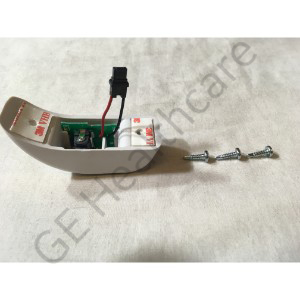
Assembly Emerald Transport Display Power Supply Adapter
| 2031237-001 | |
| 2031237-001-SVC | |
| Monitoring Solutions | |
| Patient Monitors | |
| GE HealthCare | |
Add to Wish List
Sign In & Add To Cart
Please select date
Second Opinion Approval Needed
Enter your approval number and submit to add item(s) to cart.
Approval Number
Please enter approval number
OR
Don't know your approval number? Call 800-437-1171
Enter opt 1 for the first three prompts, and have your System ID available.
If you add item(s) to cart and submit your order without the
approval number, GE will contact you before your order
can be confirmed for shipment.
Second Opinion Approval Needed
Select your approver's name and submit to add item(s) to your cart
Approver Name
Please Select Approver Name
OR
Don't know your approval number? Call 800-437-1171
Enter opt 1 for the first three prompts, and have your System ID available.
If you add item(s) to cart and submit your order without
selecting an approver, GE will contact you before your order
can be confirmed for shipment.
Product Overview
The Assembly Emerald Transport Display Power Supply Adapter is used in Patient Monitoring Systems. The installation of an adapter is clearly defined where the Disconnect the DC power supply from AC power and the Transport Pro monitor. Remove any batteries from the battery compartments. Verify that there is no power to the monitor. Using isopropyl alcohol, clean the surfaces around the power supply connector on the side of the monitor. Remove the backing from the adhesive tape on the adapter. Plug the connector on the adapter into the power supply connector on the monitor. Be sure that the black wire on the connector is up and the red wire is down and feel the connector snap in. Position the adapter on the side of the monitor, so the edge of the adapter aligns with the seam along the side of the monitor. The contour of the adapter should fit the contour of the lower portion of the monitor. Press the adapter against the monitor so that the adhesive tape adheres it to the monitor. Using the holes on the adapter as guides, drive two of the screws into the monitor to secure the adapter to the monitor. The screws should be tightened to a torque of 5 in-Lbs. If a torque driver is unavailable, tighten the screws until a snug and do not overtighten.
Compatible Products

Transport Pro V2
Transport Pro V1
Transport Pro
Equivalent Item(s):
Below is more information on the equivalent item(s). Items without a hyperlink are listed for reference only and are not available for purchase online.
| Equivalent Item(s) | Item Details |
|---|---|
| 2031237-001-SVC | Assembly Etd Ps Adapter |